Loading…
Coming Soon2026-06
TimeBridge — Instant Time Zone Converter
A Chrome extension that converts times across 20+ zones without leaving the page. Select any time on a webpage, right-click, and a floating card shows it in your zones — DST-aware, multi-destination, with live clocks in the toolbar popup.
Coming Soon
Tech Stack
Chrome ExtensionManifest V3TypeScriptReact 18LuxonWebpack 5
Screenshots
Scroll to see more →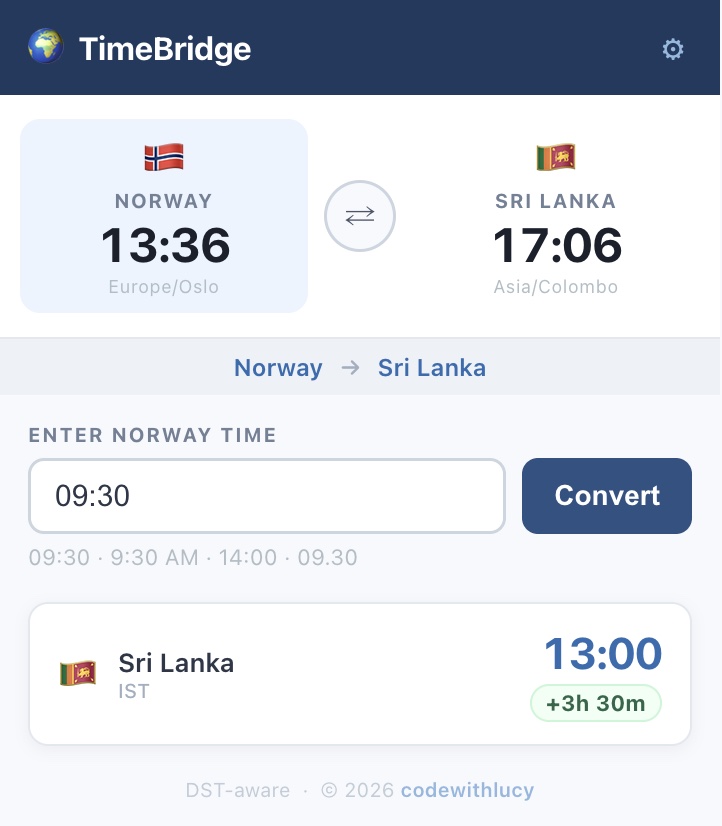
Overview
TimeBridge started as a fix for one specific annoyance: reading a meeting time written in Norwegian time and having to work out what that meant in Sri Lanka. It grew into a general-purpose converter — select any time on any webpage, right-click, and a floating card appears next to your selection with the converted time and a copy button.
It runs entirely in the browser. No account, no server, no network calls.
Features
- Right-click to convert — select a time on any page and convert it in place via the context menu
- Floating result card rendered next to your selection, with one-click copy and dismiss on Escape
- Toolbar popup with manual entry plus live ticking clocks for your source and target zones
- 20+ time zones across Europe, Asia, the Americas, Africa, the Middle East and the Pacific
- Multi-destination — pick one source zone and several targets, all converted at once
- DST-aware via Luxon and IANA zone names — no hardcoded UTC offsets that break twice a year
- Flexible parsing — handles
09:30,9:30 AM,14:00, and Scandinavian dot notation like09.30 - Settings persist through
chrome.storage.sync, so your zones follow your Chrome profile
Tech Highlights
- Chrome Extension Manifest V3 — service worker background script, content script, and popup as separate Webpack entry points
- TypeScript in strict mode throughout, with shared interfaces across the three runtime contexts
- React 18 for both the toolbar popup and the injected floating card, mounted and unmounted on demand
- Luxon for all timezone maths, driven by a table of zone configs rather than branching logic
- A modular parser built on a
TIME_PATTERNSarray — supporting a new time format means adding one entry, not editing a parser
Coming Up Next
- Chrome Web Store listing — the extension is built and working, packaging is what's left
- Automatic page scanning so times are detected without a right-click
- Hover-to-convert
Related Projects